Reference-to-video generation: three syntaxes as of November 2026
A reference is an image or a clip the model builds a new shot from: a face, the shape of a bottle, the pace of a movement. Reference-to-video generation starts with uploads, and this is where every model speaks its own language. Kling 4.0, per its official guide of 4 November 2026, numbers assets itself: @Image1, @Image2, @Video1. Models built on MiniMax H3, as the HyperFlow H3 Flash model card of 10 November 2026 shows, address them as <Picture 1>, <Picture 2>. Gemini Omni 1.2 Flash, according to the Runware API documentation, asks for plain words: "the woman from the portrait".
That is why a prompt copied from someone else's tutorial rarely transfers. The syntax belongs to one model, while the job of each asset has to be written out. Three schools below, and one shared rule: one asset, one job, stated in text.
Kling 4.0: an unlabelled @Image1 gets guessed
In Omni Reference mode assets are numbered in upload order. The guide then asks for a label: "@Image1: keep the character's appearance", "@Video1: take the pacing of the action". Numbers alone leave the model to decide what goes where, and the output becomes less predictable.
When assets carry different information, narrow each role and say plainly what must not be transferred: "@Image2: wall texture only, drop the people from that frame". One extra clause removes a pile of guesses.
The prompt structure in the guide runs in four blocks: asset roles, global settings (scene, texture, style, camera tone), timed beats (0-5 s, 5-10 s, 10 s to the end), then audio (lines, ambience, music, effects). Roles come first because everything after refers back to those numbers.
To fix footage you already have, write "Edit @Video1" and add "Keep everything else unchanged". The phrase "Reference @Video1" in the same task pushes the model toward a fresh generation and the shot gets rebuilt from nothing.
Limits for the mode: up to 10 images, up to 5 videos with 30 seconds combined, up to 3 voice profiles, up to 7 elements, and no more than 15 references in total. Keyframes cannot be combined with references in one job.
Negative instructions should stay rare. Two are worth keeping: no subtitles, no background music.
Gemini Omni 1.2 Flash: label by what is in the picture
This model works differently: images are named by what they show. "The woman from the portrait", "the bottle from the packshot". Tags and numbered placeholders add nothing. Note the source: the reference guide lives in Runware's documentation for the API, an integrator's guide, since I did not find an official Google guide on this point.
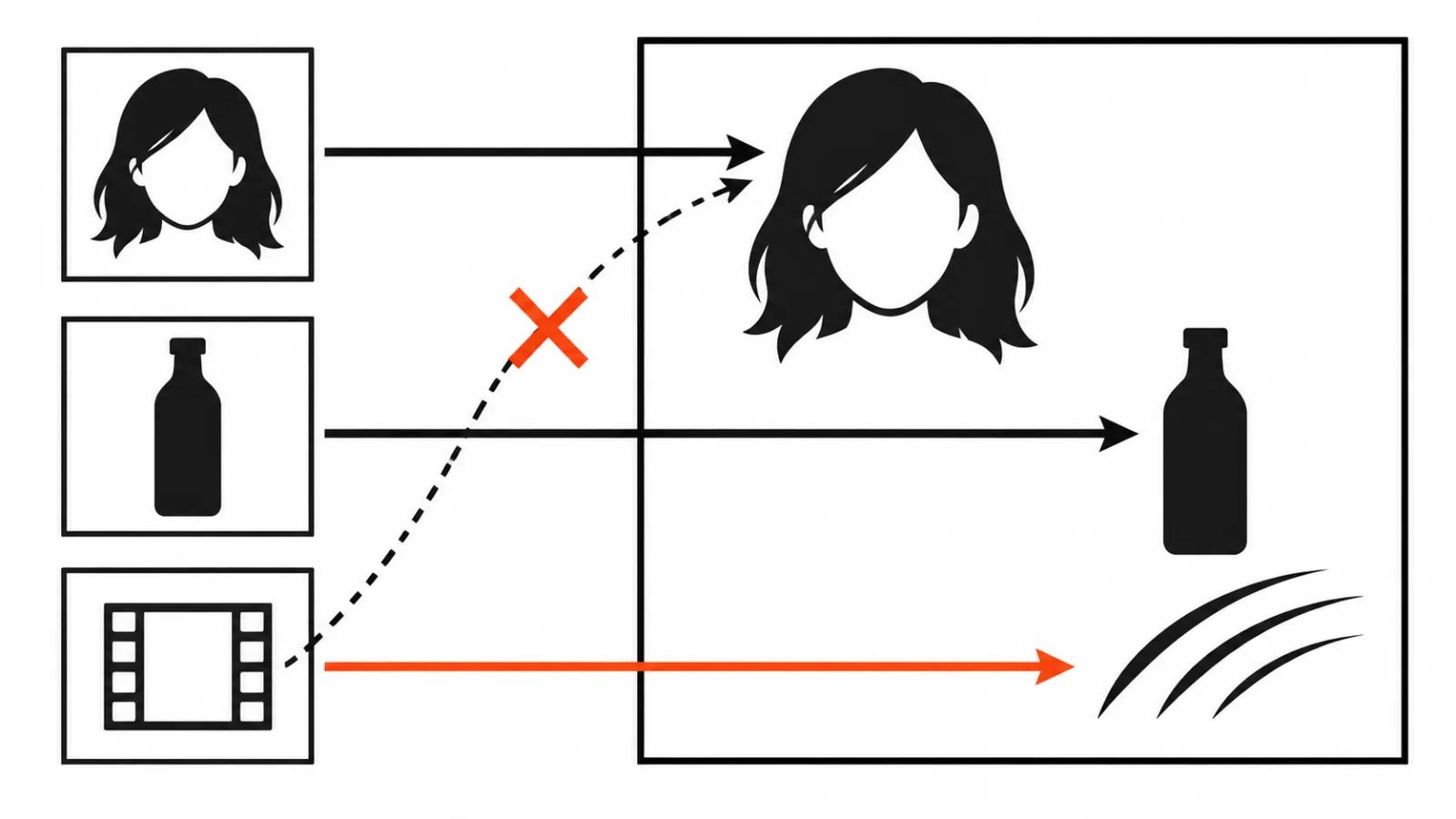
One image carries one job, and the job is a verb: "keep the face and hair", "keep the shape and the label exactly". Describing what is already visible wastes words, the model sees the hair colour and the jacket cut. Spend the text on the shot, the action, the line and the sound.
Character and style live on separate images: the person on a clean background, the style frame with nobody in it. Mix the two and the face from the style shot may leak into the hero.
A reference video holds a face better than anything else, and one video per request gives a steadier result. Several at once can make the output worse. A reference video carries no audio, all sound comes from the prompt.
Limits: up to 10 images and up to 3 videos, with 3-10 s duration once references are in play. References and first or last frame are separate modes, a request that asks for both is rejected.
The model likes to cut a clip into several shots. For one unbroken take, say so: "one continuous shot".
HyperFlow H3 Flash: <Picture 1> in order
The Hugging Face model card dated 10 November 2026 covers the ref2va mode, built on MiniMax H3. Inputs are named in prompt order: <Picture 1>, <Picture 2>. The example on the card reads "<Picture 1> walks through the scene of <Picture 2>".
Limits: up to 9 images, 3 videos, 3 audio clips, 12 inputs in total. An audio reference only works alongside at least one image or video. A negative prompt is not used at all.
How to generate video from a reference when assets disagree
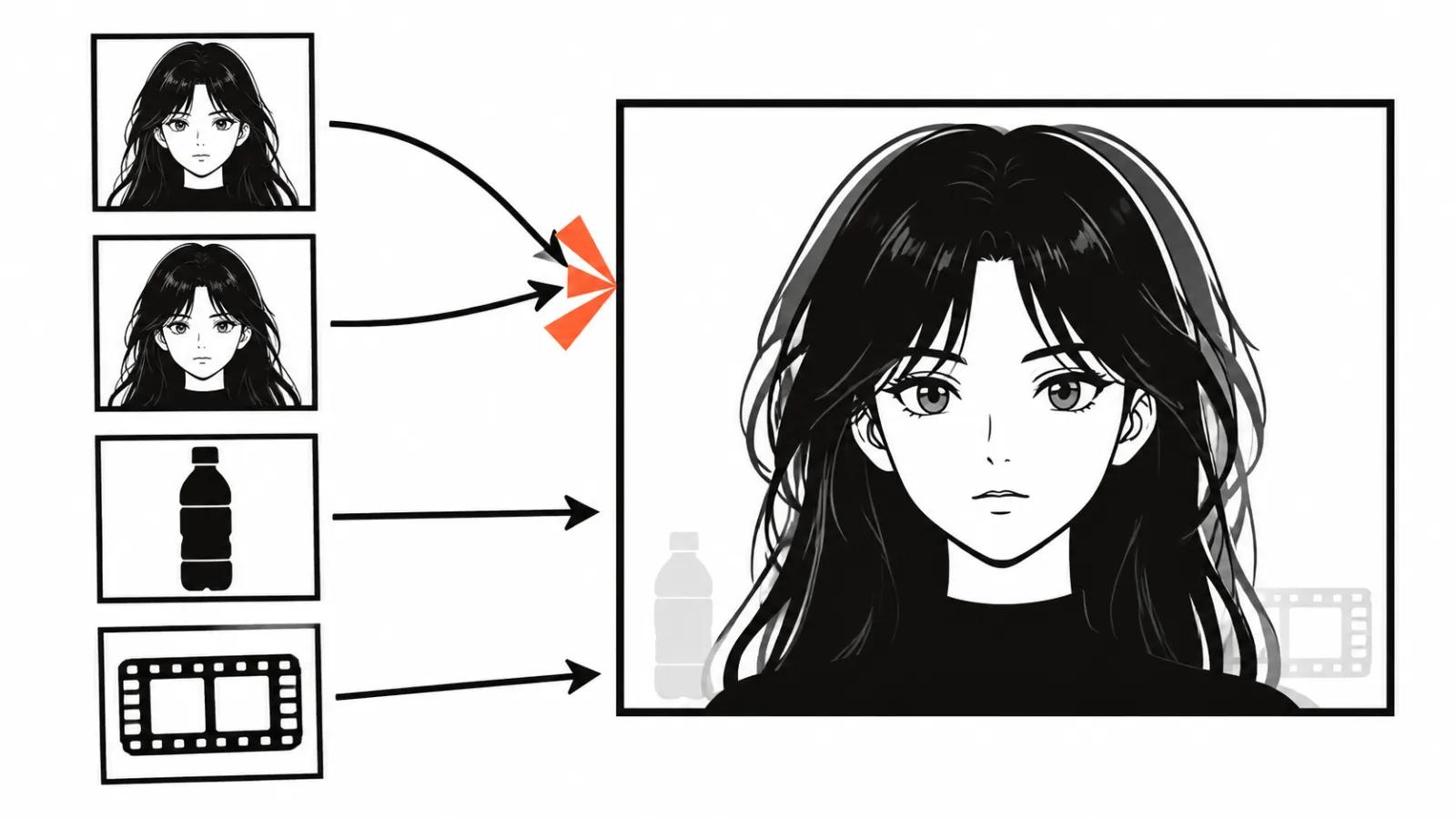
The fight starts wherever two assets claim the same thing. The usual cases: two portraits of one hero, a style frame with its own character, a video and an image both defining appearance. The model may average them and the face comes out as a stranger.
The fix is short: split the roles, drop the extra input.
Gemini Omni states this outright: one image, one job. Kling handles it by narrowing roles and excluding the rest. With H3 the extra input simply goes, and a 12 slot limit is no reason to fill every slot.
- One hero, one face image. The second portrait goes away or gets a narrow job (hair, makeup) with the face explicitly off limits.
- A style frame with no people and no large face in focus.
- The reference video owns movement and pace, appearance stays on the still.
- One test: if the asset's job cannot be said in a single sentence, the asset is spare.
A prompt example: a product ad with a presenter
The job: a 10 second vertical clip, a presenter holds a bottle and says one line. Assets: @Image1 the presenter's portrait, @Image2 the bottle packshot, @Video1 an older ad with the pacing you want.
The prompt, block by block: "@Image1: keep the presenter's face and hair. @Image2: keep the bottle shape and label exactly, hands come from @Image1. @Video1: use pacing only, do not transfer the room or the people. Scene: table by the window, soft daylight, wood texture. Camera: calm, shoulders and face, slow drift right. 0-4 s: presenter lifts the bottle. 4-7 s: speaks. 7-10 s: sets it down. Audio: one line about the price, quiet room tone, no vocals in the music".
The same asset set works in any language, the order stays: roles first, then scene, then seconds, then sound. That order comes from the Kling 4.0 guide.
A checklist before you hit generate
One job per asset, written in words.
- The hero's face lives on one image, the second portrait is gone or cut down to hair.
- No characters of their own on the style frame.
- Asset names match the syntax of this exact model.
- Whatever must not be transferred is stated outright.
- Two negatives at most: no subtitles, no background music.
My take
There is no shared syntax anywhere in sight: Kling runs on @Image1, H3 models on <Picture 1>, Omni on plain words. All three agree on the part that matters, every image gets a role and an explicit "keep this". Follow that and assets stop fighting.
On a series, the labelling pays for itself. AI video ads ship as a batch of versions, and labelled roles travel from one prompt to the next untouched. When the whole video needs to be built for you, that is AI video production, where reference labelling is part of the pipeline. The general logic of prompts sits in AI video prompts, and control over a shot through its opening and closing frames in first and last frame.
One more thing. A film shot and cut by hand, our handcrafted videos from $190, still uses references, and a person labels them. Which is why they rarely argue.